
If your email program doesn’t automatically detect that your password has been changed, here’s how to handle it.
Website Creator (Kontaktformular und Onlineshop)
- Log in to your project.
- Select “Settings” at the top, then “Email Accounts” on the left.
- Update your email address and enter your new password.
- Click “Save” in the upper-right corner and republish the project.
Outlook
- Open Control Panel via the Windows search
- Type “Mail” in the search field at the top right
- Click “Mail (Microsoft Outlook)”
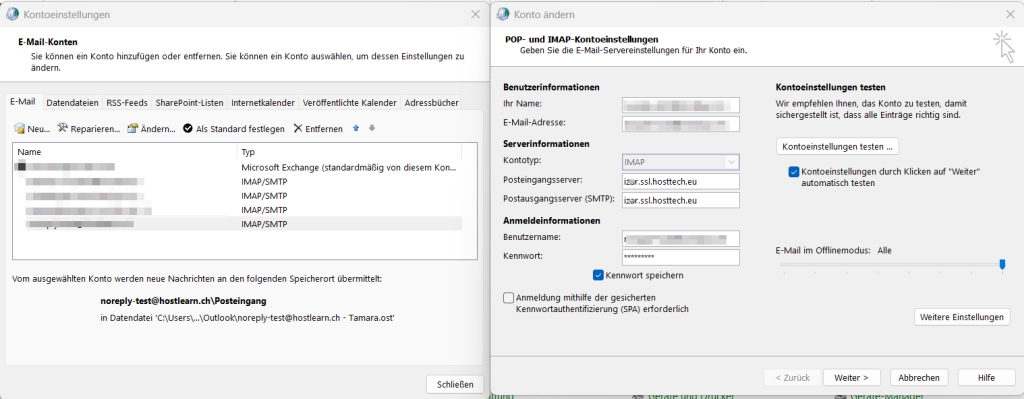
- Then select Email Accounts…
- Double-click the email account in question
- You can now enter the new password that was previously set in Plesk.
- Unten auf «Weiter» klicken.
- Settings are checked. As soon as two green ticks appear, click on “Close” and select “Finish”.
- Outlook can now be opened as usual.
Apple Mail
- Open Apple Mail.
- Select “Mail” at the top and then “Accounts”.
- Click on the account and then “Details”.
- Change the password and save it.